
第 6 章:Utility 与 System
本章将引入架构的最后两个核心概念:Utility(工具类) 和 System(系统),完成我们的架构设计。
新需求
需求 1:计数上限
计数器不能超过 20。
需求 2:阈值检查
- 当 Count > 10 时,输出提示信息
- 当 Count < -10 时,输出提示信息
方案一:在 Command 中实现(❌ 不推荐)
错误示范
public class IncreaseCountCommand : AbstractCommand
{
    protected override void OnExecute()
    {
        var model = this.GetModel<ICounterModel>()!;

        // ❌ 在 Command 里写业务规则
        if (model.Count >= 20)
        {
            return;  // 超过上限,不执行
        }

        model.Increment();
    }
}
问题
规则写死在 Command 里
- 如果别的地方也要用"最大 20"的限制怎么办?
- 规则变更(如改成 100)需要修改业务代码
无法单独测试规则
- 只能通过 Command 测试,无法单独测试规则逻辑
违反单一职责原则
- Command 应该只负责"执行操作"
- 不应该负责"业务规则验证"
引入 Utility
Utility 是什么?
Utility(工具类) 提供可复用的无状态逻辑,负责:
✅ 纯函数式的计算和验证
✅ 数据转换和格式化
✅ 业务规则的封装
Utility 不应该:
❌ 持有状态
❌ 依赖场景
❌ 直接修改 Model
特点
- 无状态:只提供计算方法
- 可复用:任何层都可以调用
- 可测试:纯函数,易于测试
1. 定义 Utility 接口
在 scripts/utility/ 创建 ICounterUtility.cs:
using GFramework.Core.Abstractions.Utility;

namespace MyGFrameworkGame.scripts.Utility;

/// <summary>
/// 计数器工具接口
/// </summary>
public interface ICounterUtility : IContextUtility
{
    /// <summary>
    /// 判断当前值是否可以增加
    /// </summary>
    bool CanIncrease(int current);

    /// <summary>
    /// 将值限制在有效范围内
    /// </summary>
    int Clamp(int value);
}
2. 实现 Utility 类
在 scripts/utility/ 创建 CounterUtility.cs:
using System;
using GFramework.Core.Utility;

namespace MyGFrameworkGame.scripts.Utility;

/// <summary>
/// 计数器工具实现
/// </summary>
public class CounterUtility : AbstractContextUtility, ICounterUtility
{
    private readonly int _maxCount;

    /// <summary>
    /// 构造函数
    /// </summary>
    /// <param name="maxCount">最大值(默认 20)</param>
    public CounterUtility(int maxCount = 20)
    {
        _maxCount = maxCount;
    }

    /// <summary>
    /// 初始化(可选)
    /// </summary>
    protected override void OnInit()
    {
        // 也可以通过上下文获取配置
    }

    /// <summary>
    /// 判断是否可以继续增加
    /// </summary>
    public bool CanIncrease(int current)
    {
        return current < _maxCount;
    }

    /// <summary>
    /// 将值限制在有效范围内
    /// </summary>
    public int Clamp(int value)
    {
        return Math.Clamp(value, 0, _maxCount);
    }
}
为什么用构造函数传参?
这里使用构造函数传递 maxCount 是为了灵活性。你也可以:
- 从配置文件读取
- 通过
architecture.Context.GetUtility()传入 - 硬编码在类内部
选择取决于项目需求。
3. 注册 Utility
编辑 scripts/module/UtilityModule.cs:
using GFramework.Core.Abstractions.Architecture;
using GFramework.Game.Architecture;
using MyGFrameworkGame.scripts.Utility;

namespace MyGFrameworkGame.scripts.module;

/// <summary>
/// 工具模块,负责注册所有的工具类
/// </summary>
public class UtilityModule : AbstractModule
{
    public override void Install(IArchitecture architecture)
    {
        // 注册 CounterUtility,最大值设为 20
        architecture.RegisterUtility<ICounterUtility>(new CounterUtility(maxCount: 20));
    }
}
4. 在 Command 中使用 Utility
编辑 IncreaseCountCommand.cs:
using GFramework.Core.Command;
using GFramework.Core.Extensions;
using MyGFrameworkGame.scripts.Model;
using MyGFrameworkGame.scripts.Utility;

namespace MyGFrameworkGame.scripts.Command;

public class IncreaseCountCommand : AbstractCommand
{
    protected override void OnExecute()
    {
        var model = this.GetModel<ICounterModel>()!;
        var utility = this.GetUtility<ICounterUtility>()!;

        // ✅ 使用 Utility 检查规则
        if (!utility.CanIncrease(model.Count))
        {
            return;  // 超过上限,不执行
        }

        model.Increment();
    }
}
运行游戏
现在点击增加按钮,计数器最多只能到 20。
Utility 的优势
1. 规则复用
假设多个地方需要检查上限:
// Command 中
if (!utility.CanIncrease(model.Count)) return;

// System 中
if (!utility.CanIncrease(value)) { /* ... */ }

// Controller 中
if (utility.CanIncrease(count)) { /* ... */ }
规则只写一次,到处可用!
2. 易于修改
需要改上限为 100?
// 只需修改注册时的参数
architecture.RegisterUtility<ICounterUtility>(new CounterUtility(maxCount: 100));
不需要改任何业务代码!
3. 易于测试
[Test]
public void CanIncrease_WhenAtMax_ReturnsFalse()
{
    var utility = new CounterUtility(maxCount: 20);

    Assert.IsFalse(utility.CanIncrease(20));
    Assert.IsTrue(utility.CanIncrease(19));
}
纯函数,测试简单!
引入 System
System 是什么?
现在有个新需求:
- 当 Count > 10 时,输出提示信息 "Count 超过 10"
- 当 Count < -10 时,输出提示信息 "Count 小于 -10"
这些逻辑应该写在哪里?
❌ 不应该在 Command 里:
protected override void OnExecute()
{
    model.Increment();

    // ❌ Command 不应该关心这些"连锁反应"
    if (model.Count > 10) { /* ... */ }
    if (model.Count < -10) { /* ... */ }
}
为什么?
- Command 只应该关心"行为"
- 不应该关心"系统状态带来的连锁反应"
✅ 应该在 System 里:
System(系统) 负责响应状态变化,执行系统级逻辑。
System 的职责
✅ 监听状态变化
✅ 执行规则检查
✅ 触发系统级反应
✅ 协调多个 Model 的交互
System 不应该:
❌ 直接修改 Model(应通过 Command)
❌ 包含 UI 逻辑
1. 定义 System 接口
在 scripts/system/ 创建 ICounterThresholdSystem.cs:
namespace MyGFrameworkGame.scripts.System;

/// <summary>
/// 计数器阈值检查系统接口
/// </summary>
public interface ICounterThresholdSystem
{
    /// <summary>
    /// 检查当前计数值是否超过阈值
    /// </summary>
    void CheckThreshold(int count);
}
2. 实现 System 类
在 scripts/system/ 创建 CounterThresholdSystem.cs:
using GFramework.Core.Extensions;
using GFramework.Core.System;
using Godot;
using MyGFrameworkGame.scripts.Model;

namespace MyGFrameworkGame.scripts.System;

/// <summary>
/// 计数器阈值检查系统
/// </summary>
public class CounterThresholdSystem : AbstractSystem, ICounterThresholdSystem
{
    /// <summary>
    /// 初始化时注册事件监听
    /// </summary>
    protected override void OnInit()
    {
        // 监听计数变化事件
        this.RegisterEvent<CounterModel.ChangedCountEvent>(e =>
        {
            CheckThreshold(e.Count);
        });
    }

    /// <summary>
    /// 检查阈值
    /// </summary>
    public void CheckThreshold(int count)
    {
        if (count > 10)
        {
            GD.Print("Count 超过 10");
        }

        if (count < -10)
        {
            GD.Print("Count 小于 -10");
        }
    }
}
System 的生命周期
AbstractSystem 会在注册时自动调用 OnInit(),所以事件监听会在系统初始化时完成。
3. 注册 System
编辑 scripts/module/SystemModule.cs:
using GFramework.Core.Abstractions.Architecture;
using GFramework.Game.Architecture;
using MyGFrameworkGame.scripts.System;

namespace MyGFrameworkGame.scripts.module;

/// <summary>
/// 系统模块,负责注册所有的系统逻辑
/// </summary>
public class SystemModule : AbstractModule
{
    public override void Install(IArchitecture architecture)
    {
        // 注册阈值检查系统
        architecture.RegisterSystem<ICounterThresholdSystem>(new CounterThresholdSystem());
    }
}
4. 运行游戏
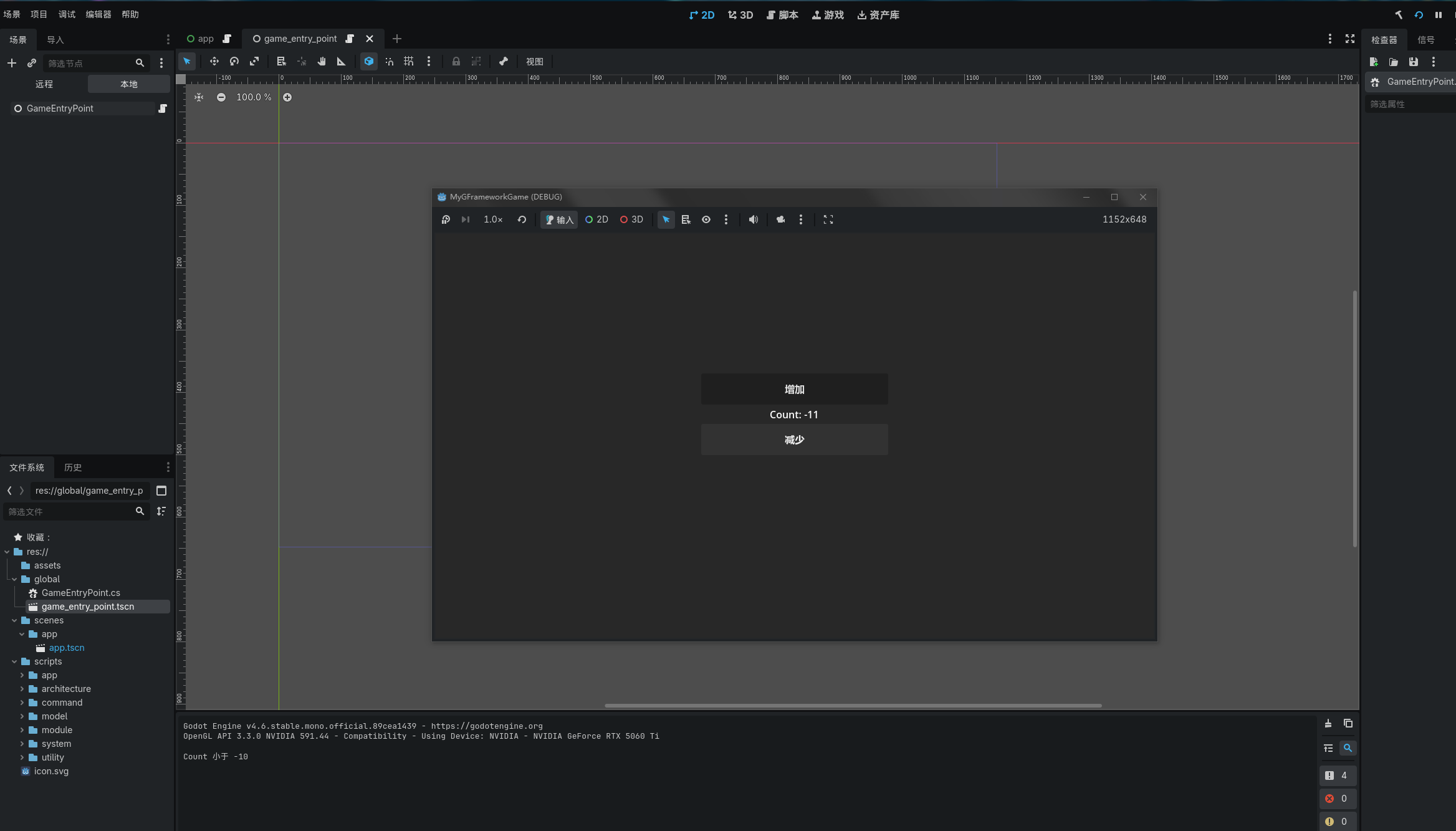
启动游戏,当计数超过 10 或小于 -10 时,输出面板会显示提示信息:
System 的优势
1. 关注点分离
Command 负责"做什么":
model.Increment(); // 执行操作System 负责"响应状态":
if (count > 10) { /* 触发反应 */ }2. 逻辑集中
假设将来需求变更:
- 达到 5 播放音效
- 达到 15 触发警告
- 达到 20 锁定按钮
❌ 如果写在 Command:
// 在 N 个 Command 里重复相同逻辑
if (count == 5) PlaySound();
if (count == 15) ShowWarning();
if (count == 20) LockButton();
✅ 集中在 System:
public void CheckThreshold(int count)
{
    if (count == 5) PlaySound();
    if (count == 15) ShowWarning();
    if (count == 20) LockButton();
}
只需修改一处!
3. 支持复杂规则
System 可以协调多个 Model:
protected override void OnInit()
{
    // 同时监听多个事件
    this.RegisterEvent<CounterChangedEvent>(e => { /* ... */ });
    this.RegisterEvent<ScoreChangedEvent>(e => { /* ... */ });

    // 当两个条件同时满足时触发
    if (counter > 10 && score > 100)
    {
        UnlockAchievement();
    }
}
完整架构总览
现在我们的架构已经完整:
┌─────────────┐
│    View     │  Godot UI 节点
└──────┬──────┘
       │
┌──────▼──────┐
│ Controller  │  将用户操作转为命令
└──────┬──────┘
       │
┌──────▼──────┐
│  Command    │  封装业务逻辑
└──────┬──────┘
       │
┌──────▼──────┐
│   Model     │  存储状态,发送事件
└──────┬──────┘
       │
       ├─────────┐
       │         │
┌──────▼──────┐  │
│   Event     │  │
└──────┬──────┘  │
       │         │
┌──────▼──────┐  │
│  System     │  │  响应状态变化
└──────┬──────┘  │
       │         │
┌──────▼──────┐  │
│  Utility    │◄─┘  提供业务规则
└─────────────┘
数据流
用户点击按钮
    ↓
Controller: SendCommand(IncreaseCommand)
    ↓
Command: GetUtility().CanIncrease() → 检查规则
    ↓
Command: GetModel().Increment() → 修改状态
    ↓
Model: SendEvent(ChangedCountEvent) → 发送事件
    ↓
    ├→ Controller: RegisterEvent → 更新 UI
    └→ System: RegisterEvent → 检查阈值
各层职责总结
| 层级 | 职责 | 示例 |
|---|---|---|
| View | 呈现 UI,接收输入 | Label、Button |
| Controller | 转发用户意图 | 将点击转为命令 |
| Command | 执行业务操作 | 增加计数 |
| Model | 存储状态,发送事件 | 计数器的值 |
| Event | 通知状态变化 | ChangedCountEvent |
| System | 响应状态,执行规则 | 阈值检查 |
| Utility | 提供业务规则 | 上限验证 |
设计原则
单向数据流
Action → Command → Model → Event → View/System- 数据总是单向流动
- 没有循环依赖
- 易于理解和调试
关注点分离
Controller → "做什么"
Command   → "怎么做"
Model     → "状态是什么"
System    → "状态变化后做什么"
Utility   → "规则是什么"
依赖倒置
都依赖接口,不依赖具体实现

ICounterModel ← CounterModel
ICounterUtility ← CounterUtility
ICounterThresholdSystem ← CounterThresholdSystem
何时使用 Utility vs System
Utility
✅ 无状态的计算:
utility.CanIncrease(count)
utility.Clamp(value)
utility.ValidateEmail(email)
✅ 业务规则验证:
if (!utility.CanPurchase(player, item)) return;System
✅ 状态驱动的逻辑:
if (count > 10) { /* 触发某些事情 */ }✅ 协调多个 Model:
if (player.Level > 10 && achievement.Count > 5) { /* ... */ }✅ 系统级反应:
PlaySound();
ShowNotification();
UpdateAchievement();
核心收获
通过本章,我们学到了:
| 概念 | 解释 |
|---|---|
| Utility | 无状态的业务规则和计算 |
| System | 响应状态变化,执行系统逻辑 |
| 关注点分离 | 每一层专注自己的职责 |
| 单向数据流 | 数据流向清晰可控 |
| 事件驱动 | 通过事件解耦组件 |
完整代码回顾
项目结构
MyGFrameworkGame/
├── scripts/
│   ├── architecture/
│   │   └── GameArchitecture.cs
│   ├── module/
│   │   ├── ModelModule.cs
│   │   ├── SystemModule.cs
│   │   └── UtilityModule.cs
│   ├── model/
│   │   ├── ICounterModel.cs
│   │   └── CounterModel.cs
│   ├── command/
│   │   ├── IncreaseCountCommand.cs
│   │   └── DecreaseCountCommand.cs
│   ├── utility/
│   │   ├── ICounterUtility.cs
│   │   └── CounterUtility.cs
│   ├── system/
│   │   ├── ICounterThresholdSystem.cs
│   │   └── CounterThresholdSystem.cs
│   └── app/
│       └── App.cs
├── global/
│   └── GameEntryPoint.cs
└── scenes/
    └── App.tscn
架构层次
GameEntryPoint (入口)
    ↓
GameArchitecture (架构)
    ↓
Module (模块)
    ├── ModelModule → CounterModel
    ├── SystemModule → CounterThresholdSystem
    └── UtilityModule → CounterUtility
下一步
恭喜!你已经完成了基础教程的核心内容,掌握了 GFramework 的完整架构设计。
在最后一章中,我们将:
- 回顾整个架构设计
- 总结最佳实践
- 解答常见问题
- 指引下一步学习方向
本章检查清单
- [ ] ICounterUtility 和 CounterUtility 已创建
- [ ] Utility 已注册到 UtilityModule
- [ ] IncreaseCountCommand 使用 Utility 检查规则
- [ ] ICounterThresholdSystem 和 CounterThresholdSystem 已创建
- [ ] System 已注册到 SystemModule
- [ ] 运行游戏,计数最大为 20
- [ ] 超过阈值时能看到提示信息
- [ ] 理解了 Utility 和 System 的职责区别
思考题
- 如果需要在多个 System 之间通信,应该怎么做?
- Utility 和 System 哪个应该先注册?为什么?
- 如何实现"计数为偶数时播放音效"的功能?
这些问题会在进阶教程中探讨!